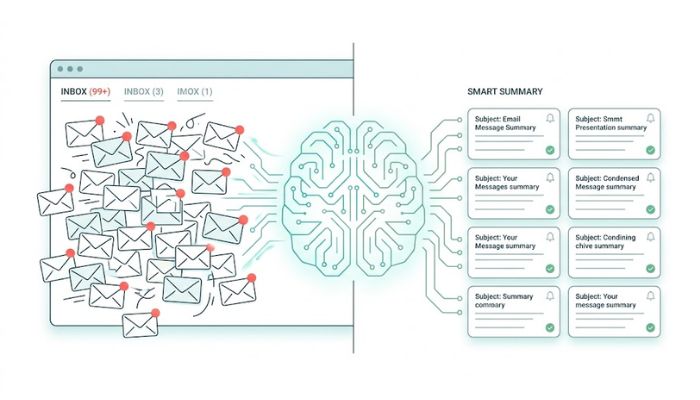
The average professional receives 120+ emails a day. Reading, processing, and responding to all of them isn't just exhausting — it's unsustainable. An AI email summarizer cuts through that noise by distilling every message into what actually matters: the key point, the required action, and the deadline.
But the best AI email tools don't stop at summarising. They connect your inbox to your calendar, your tasks, and your daily plan — so reading an email automatically triggers the next step. That's where Superchat comes in.
What Is an AI Email Summarizer?
An AI email summarizer app uses natural language processing to read your emails and extract the most important information — stripping away greetings, disclaimers, and filler to surface what you actually need to know.
Instead of opening a 400-word email chain and hunting for the decision buried in reply #7, you get:
A 2–3 sentence summary of the thread
The key action required from you
Any deadlines or dates mentioned
Names and contacts involved
For newsletters, an AI newsletter summarizer works similarly — compressing a 10-minute read into a 30-second brief, so you stay informed without losing half your morning to your inbox.
Why Your Inbox Is Costing You More Than You Think
Inbox overload isn't just an annoyance — it's a productivity crisis. Research consistently shows that:
Professionals spend an average of 2.6 hours per day reading and answering email
It takes an average of 23 minutes to fully refocus after an email interruption
Most emails contain one actionable item buried in excessive context
An AI email summarizer recovers that time by making triage instantaneous. You know what needs a reply, what needs action, and what can be ignored — without reading every word.
How Superchat Handles Your Email Intelligently
Superchat is an AI personal assistant built in the UAE that goes far beyond email summarisation. Its Email & Calendar integration connects your inbox to your entire daily workflow — so an email isn't just summarised, it's acted upon.
What Superchat Does With Your Emails
Summarises threads instantly Ask "What's in my inbox today?" and Superchat gives you a prioritised digest — the most urgent messages first, with a one-line summary of each.
Extracts action items Instead of re-reading an email to find out what you need to do, Superchat surfaces the action directly: "Your client wants a revised proposal by Thursday. Want me to block time for it tomorrow?"
Connects to your calendar When an email contains a meeting request, date, or deadline, Superchat's Email & Calendar integration adds it to your schedule automatically — no copy-pasting, no manual entry.
Triggers smart reminders Via Notifications, Superchat can remind you to follow up on an unanswered email, flag a deadline approaching, or alert you when a specific sender replies.
Connects to your full assistant Unlike a standalone email summarizer app, Superchat links your inbox to bookings, payments, and planning. An email about a hotel confirmation? Superchat adds it to your trip itinerary. An invoice email? It flows into your expense manager.
AI Email Summarizer vs. Traditional Email Management
Feature | Gmail / Outlook | Standalone Summarizer App | Superchat AI |
Inbox summarisation | ❌ | ✅ | ✅ |
Action item extraction | ❌ | Partial | ✅ |
Calendar integration | Manual | ❌ | ✅ Auto |
Smart reminders | Basic | ❌ | ✅ Contextual |
Expense / invoice tracking | ❌ | ❌ | ✅ |
Trip / booking connection | ❌ | ❌ | ✅ |
Conversational interface | ❌ | ❌ | ✅ |
UAE-specific context | ❌ | ❌ | ✅ |
Newsletter Overload: The AI Newsletter Summarizer Use Case
Most professionals subscribe to far more newsletters than they read. An AI newsletter summarizer solves this by treating newsletters as an information feed to be curated rather than a reading list to be completed.
With Superchat, you can say:
"Summarise any newsletters I received this week."
Superchat scans your inbox, identifies newsletter content, and produces a brief digest — key headlines, main arguments, and anything directly relevant to your work or interests. You stay current without the time cost.
This is particularly useful for:
Industry news and market updates
Product announcements from tools you use
Weekly digests from publications or communities
Promotional emails worth flagging vs. ones to ignore
How to Start Using Superchat as Your AI Email Assistant
Download Superchat from the App Store or Google Play
Connect your email account (Gmail, Outlook, or corporate email)
Link your calendar for seamless scheduling from your inbox
Ask your first question: "What emails need my attention today?"
Let Superchat act — approve calendar additions, delegate replies, or set follow-up reminders in one message
For more on getting the most from Superchat's assistant capabilities, read how AI assistants work and how to talk to AI effectively.
Real-World Scenarios
The executive with 200 unread emails:
"Superchat, what do I actually need to deal with in my inbox today?" → Superchat surfaces 4 urgent threads, extracts 3 action items, and adds 2 meeting requests to the calendar.
The remote worker drowning in newsletter subscriptions:
"Give me a 2-minute brief on everything in my inbox from the last 3 days." → Superchat delivers a structured digest: decisions needed, follow-ups pending, and newsletters summarised.
The travelling professional:
"Summarise any booking confirmations in my email and add them to my trip plan." → Superchat reads flight and hotel confirmations and adds them directly to the trip planner.
Frequently Asked Questions
Q: What is the best AI email summarizer app? A: For standalone summarisation, tools like SaneBox or Shortwave offer good inbox digests. For a fully integrated experience where email connects to your calendar, tasks, expenses, and bookings, Superchat is the most complete solution — especially for UAE users.
Q: Can AI summarize email newsletters? A: Yes. Superchat's Email & Calendar integration can identify and summarise newsletters on demand, giving you a quick digest without reading each one.
Q: Is an AI email summarizer secure? A: Superchat uses encrypted connections and does not store or sell your email content. Your data remains private.
Q: Does Superchat replace my email app? A: No — Superchat works alongside your existing email client (Gmail, Outlook, etc.), adding an AI layer that summarises, extracts actions, and connects your inbox to the rest of your day.
An AI email summarizer is no longer a luxury for executives with overflowing inboxes — it's a practical tool for anyone who wants to reclaim time and stay on top of their communications without reading every word.
Superchat takes it further: connecting your email to your calendar, your expenses, your bookings, and your daily plan — so that processing your inbox doesn't just inform you, it moves your day forward.
Connect your inbox to Superchat →
Related reads:


