Your phone is buzzing again. One call is probably a client. One might be a delivery driver. Two are almost certainly junk. You silence the screen, reopen your calendar, and type the same search many busy professionals type when they’ve had enough: call assistant apk.
That search makes sense. You want fewer interruptions, less spam, and some help sorting the calls that matter from the ones that waste your day. But when you go looking for APKs, you leave the safer world of verified app stores and enter a mess of copycat listings, fragmented versions, vague permissions, and privacy questions that most download pages never answer.
If you're considering this route, treat it like a security decision, not a convenience download. If you're operating in the UAE, this overview of AI call assistant options in the UAE is a useful reference point before you install anything.
Table of Contents
The Search for a Smarter Way to Handle Calls
Where the search usually starts
What busy professionals actually need
Why Sideloading a Call Assistant APK Can Be Risky
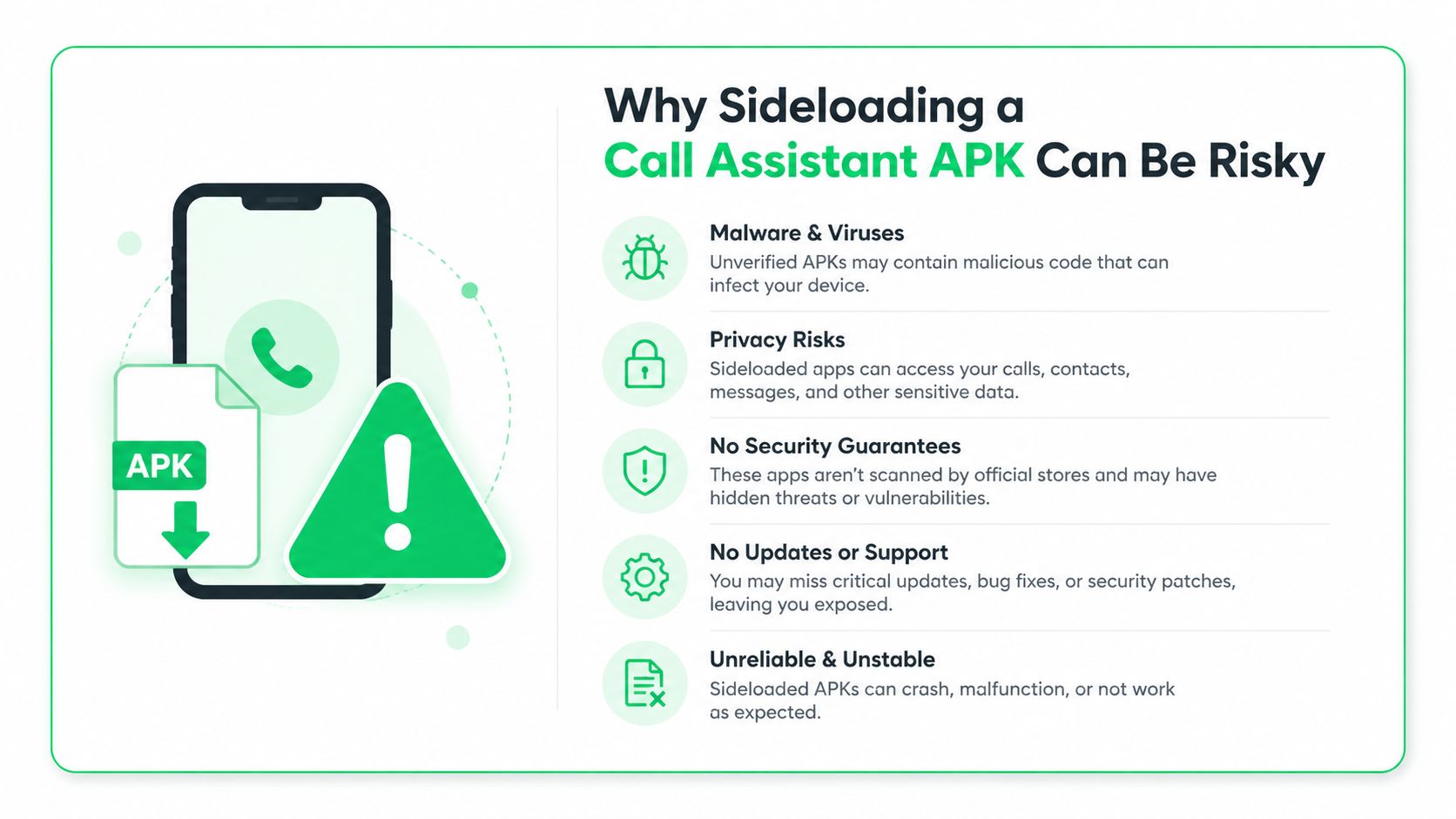
Privacy is the first red flag
APKs expand the attack surface
Many listings aren't built for serious workflows
Stability matters more than most people think
A Security-First Approach to Finding and Installing APKs
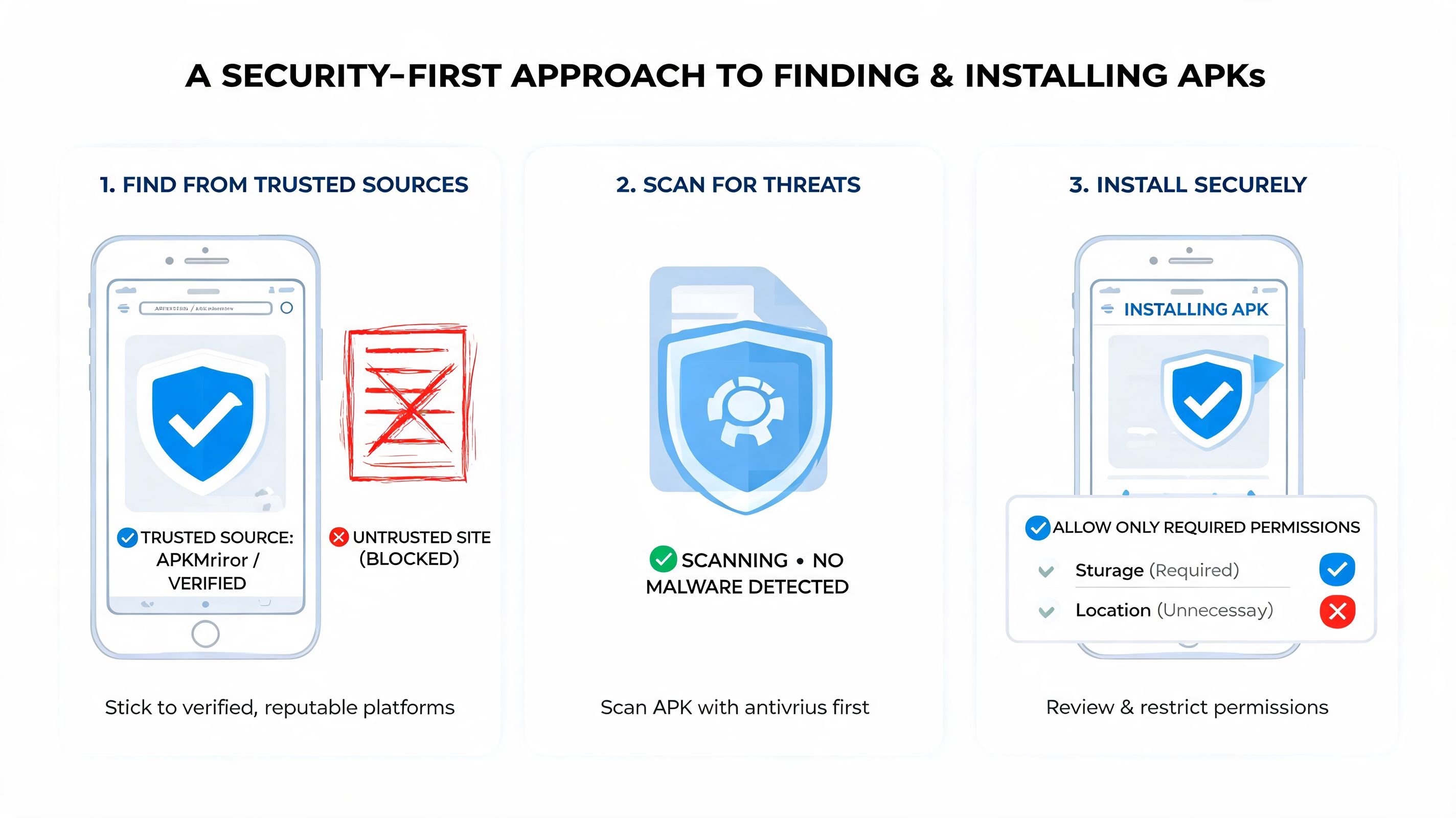
Start with source discipline
Use a short vetting checklist
Verify what the app can actually do
Install with a containment mindset
Keep an exit plan
The Professional Alternative An Integrated AI Assistant
What modern call assistants do differently
APK workflow versus integrated workflow
What to look for instead
What tends to work in practice
Troubleshooting Common Call Assistant App Failures
If the app crashes on launch
If call screening or forwarding doesn’t activate
If microphone or notification access keeps disappearing
If the app works badly with your daily setup
Your Time Is Too Valuable for Risky Shortcuts
The Search for a Smarter Way to Handle Calls
A founder leaves a board call and sees missed calls from an unknown number, a supplier, and a family member. An agency lead is trying to review a proposal while repeated spam calls break concentration. A frequent traveler lands, disables airplane mode, and gets hit with voicemail notifications, callbacks, and sales calls all at once.
That’s why people search for a call assistant apk. They’re not looking for novelty. They want control.
Where the search usually starts
Users often don’t begin with a full procurement mindset. They begin with urgency. The search results blend together: prank apps, spam blockers, AI screeners, and repackaged APK files hosted on third-party sites.
That mix matters because not every “call assistant” does the same job.
Type | What it usually does | Where it falls short |
|---|---|---|
Fake call app | Simulates incoming calls | Useful for pranks or staged exits, not real call handling |
Spam blocker | Flags or blocks suspected junk calls | Often limited by permissions, carrier behavior, or device settings |
AI call assistant | Screens calls, transcribes, or handles routine interactions | Raises bigger privacy and call-forwarding questions |
A real example shows the gap. The prank-focused Call Assistant: Fake Call App under package cloud.host.fakecall has features like scheduled fake incoming calls, custom caller name and photo, delay timers, voice playback, and over 36 call screen layouts, but it explicitly does not provide real incoming call functionality. It has 14,000 total downloads, an average 3.67 out of 5 rating from 100 ratings, and a recent pace of 19 downloads per day, according to its AppBrain listing.
A lot of frustration starts with a naming problem. “Call assistant” can mean a prank simulator, a spam filter, or an AI call workflow tool. If you don’t separate those categories first, you can install the wrong app and still have the same interruption problem.
What busy professionals actually need
They usually need three things:
Reliable screening: Tell me whether I should answer.
Low friction: Don’t make me babysit the app.
Defensible privacy: Don’t create a new exposure point for contacts, recordings, or business conversations.
The quick download instinct is understandable. The hidden cost is that APK installation turns a simple productivity problem into a security review.
Why Sideloading a Call Assistant APK Can Be Risky
The main risk isn't just malware. It's uncertainty. With sideloaded communication apps, uncertainty is dangerous because the app sits close to your calls, microphone, contacts, notifications, and sometimes call forwarding setup.
Privacy is the first red flag
For professionals, call data is rarely casual. It may include client names, call summaries, voicemail content, or callback patterns. A 2025 report on mobile AI apps noted that 68% of users worry about voice data privacy, and 40% abandon apps due to unclear policies, according to Newswire coverage of Call Assistant’s launch.
That concern is justified. Many call assistant apps require conditional call forwarding to screen calls in real time. If the vendor doesn’t clearly document encryption, retention, and failure handling, you’re trusting a critical communication path without enough evidence.
APKs expand the attack surface
An app downloaded from an official store can still be flawed. A sideloaded APK adds more variables:
Unknown publisher chain: You may not know whether the file was modified after release.
Delayed or missing updates: Security fixes can lag when you're relying on mirrors or reposted builds.
Permission overreach: A weak app can request microphone, contacts, notifications, and phone permissions that exceed its actual purpose.
One technical check I recommend for Android apps is reviewing whether the package exposes embedded secrets. This guide on how to identify exposed API keys in Android apps is useful because hardcoded keys often signal sloppy mobile security practices.
Practical rule: If an APK handles calls or recordings and the publisher can’t explain how data is protected, don’t install it on a phone used for work.
Many listings aren't built for serious workflows
The category itself is noisy. Some “call assistant” apps are lightweight prank tools dressed up in productivity language. Others are experimental blockers with little support. That mismatch creates a second kind of risk: operational failure.
If you install an app expecting reliable screening and get a fake-call simulator or a poorly maintained utility, you’ve spent time, granted permissions, and increased risk without solving the original problem.
Stability matters more than most people think
A call tool doesn't need to crash often to become a problem. It only needs to fail during one client callback, one urgent hospital call, or one number verification flow. With sideloaded APKs, your odds of inconsistent behavior rise because build quality, support, and compatibility are harder to validate before install.
A Security-First Approach to Finding and Installing APKs
If you still want to install a call assistant apk, act like an auditor, not a downloader. The goal isn’t merely to get the file onto your phone. The goal is to reduce avoidable risk before the app touches sensitive permissions.
Start with source discipline
Your first decision is whether the source behaves like a software distributor or a file dump. Avoid random forum attachments, “mod APK” pages, and mirrors that don’t identify the package name, version, update date, or developer history.
Version sprawl is a real issue here. Call assistant APKs are distributed across versions ranging from v3.x to v13.9, require Android 4.4+, and vary in size from 13 MB to over 42 MB, which makes it harder to verify which build is current and which one is safe, according to CNET’s release tracking for Call Assistant.
That should change your behavior immediately. Don’t search for “latest APK” and trust the first result. Match the package name, version history, and update timing before you download anything.
Use a short vetting checklist
Before installation, check these points:
Publisher identity: Does the listing consistently name the developer and package?
Release consistency: Do the version numbers and file sizes make sense across sources?
Permission fit: Does the app ask only for what its main function needs?
Scan before install: Upload the APK to a file scanning service and review the result.
Test on a secondary device first: Never make your primary work phone the first environment.
If you need a broader Android hygiene refresher before sideloading, this walkthrough from Gini Help on blocking mobile threats on Android is a practical companion.
Verify what the app can actually do
Read the feature list with a skeptical eye. A fake call app should not imply enterprise-grade screening. An AI screener should explain whether it depends on call forwarding, local permissions, or cloud processing.
A useful filter is to ask: what happens if the phone is offline, the battery saver is on, or Android revokes a permission? If the vendor never addresses those basics, assume reliability will be uneven.
Don’t judge the app by the icon and screenshots. Judge it by the package details, permissions, and whether the claims line up with how Android actually handles calls.
Install with a containment mindset
After download, don’t tap through setup at full speed. Slow down at the permission screen.
Use this order:
Allow the minimum first: Start with phone access only if the app can’t function without it.
Delay microphone access: If live voice features are optional, don’t approve them immediately.
Review notification access carefully: It can expose message previews and sensitive alerts.
Re-check in Android settings: Some apps ask again later, after onboarding.
Then test the app in a narrow scenario. Use one trusted contact, one test call, and one voicemail or transcript flow if relevant. Don’t route your full day through the app on the first attempt.
Keep an exit plan
The safest APK users are the ones willing to uninstall quickly. If the app drains battery, breaks call notifications, asks for unrelated permissions, or creates forwarding confusion, remove it.
For readers comparing more complete assistant apps before making that call, this guide on choosing an AI assistant app in the UAE helps frame the decision around trust and workflow fit, not just feature lists.
The Professional Alternative An Integrated AI Assistant
The better question for most professionals isn’t “How do I safely sideload this APK?” It’s “Should I be solving this problem with sideloading at all?”
For a prank app or a hobby tool, the answer may be yes. For work communication, usually no.
What modern call assistants do differently
The category has split. Basic APKs simulate calls or block obvious spam. True AI call assistants add functions like real-time transcription and an Autopilot AI that can handle routine calls. That matters in regions such as the US, Europe, and UAE, where mobile call volume exceeds 2.5 trillion minutes annually, and spam affects 30% to 40% of calls in some regions, based on the Google Play listing for AI Call Assistant & Screener.
Those capabilities are useful. But utility alone isn’t enough for a professional environment. The delivery model matters too.
APK workflow versus integrated workflow
Decision factor | Sideloaded APK | Integrated assistant app |
|---|---|---|
Installation trust | Depends on third-party source validation | Typically downloaded through an official channel |
Version confidence | Often fragmented and harder to verify | Usually tied to a maintained release path |
Data handling clarity | May be vague or incomplete | More likely to publish a clear privacy model |
Workflow scope | Usually single-purpose | Can connect calls with schedule, messages, and follow-ups |
Support burden | Falls on the user | Shared with the app provider |
That difference is why many professionals are better served by an integrated assistant than a standalone APK.
What to look for instead
A serious alternative should handle more than a call event. It should help manage what the call creates: a calendar change, a follow-up, a payment reminder, a task, or a message draft.
One option in this category is Superchat’s Smart Assistant, which is built to turn conversations into actions across calendars, messaging, travel, and payments inside one workflow. For a busy professional, that model is often more practical than stitching together a call APK, a calendar app, a notes app, and manual follow-ups.
If the tool only helps you answer the call but doesn’t help you act on the outcome, it only solves half the problem.
What tends to work in practice
For executives and operators, the durable setup usually looks like this:
Official distribution: Install from a verified app channel whenever possible.
Clear privacy terms: Know whether recordings, transcripts, or forwarding data are encrypted and retained.
Integrated actions: Let the assistant schedule, summarize, and follow up in the same environment.
Reduced app sprawl: Fewer tools mean fewer permissions, fewer sync conflicts, and less maintenance.
That’s the core advantage. Not novelty. Less administrative drag.
Troubleshooting Common Call Assistant App Failures
Even good apps fail on Android when permissions, battery controls, and dialer settings collide. Most call assistant problems come from system restrictions, not just bad software.
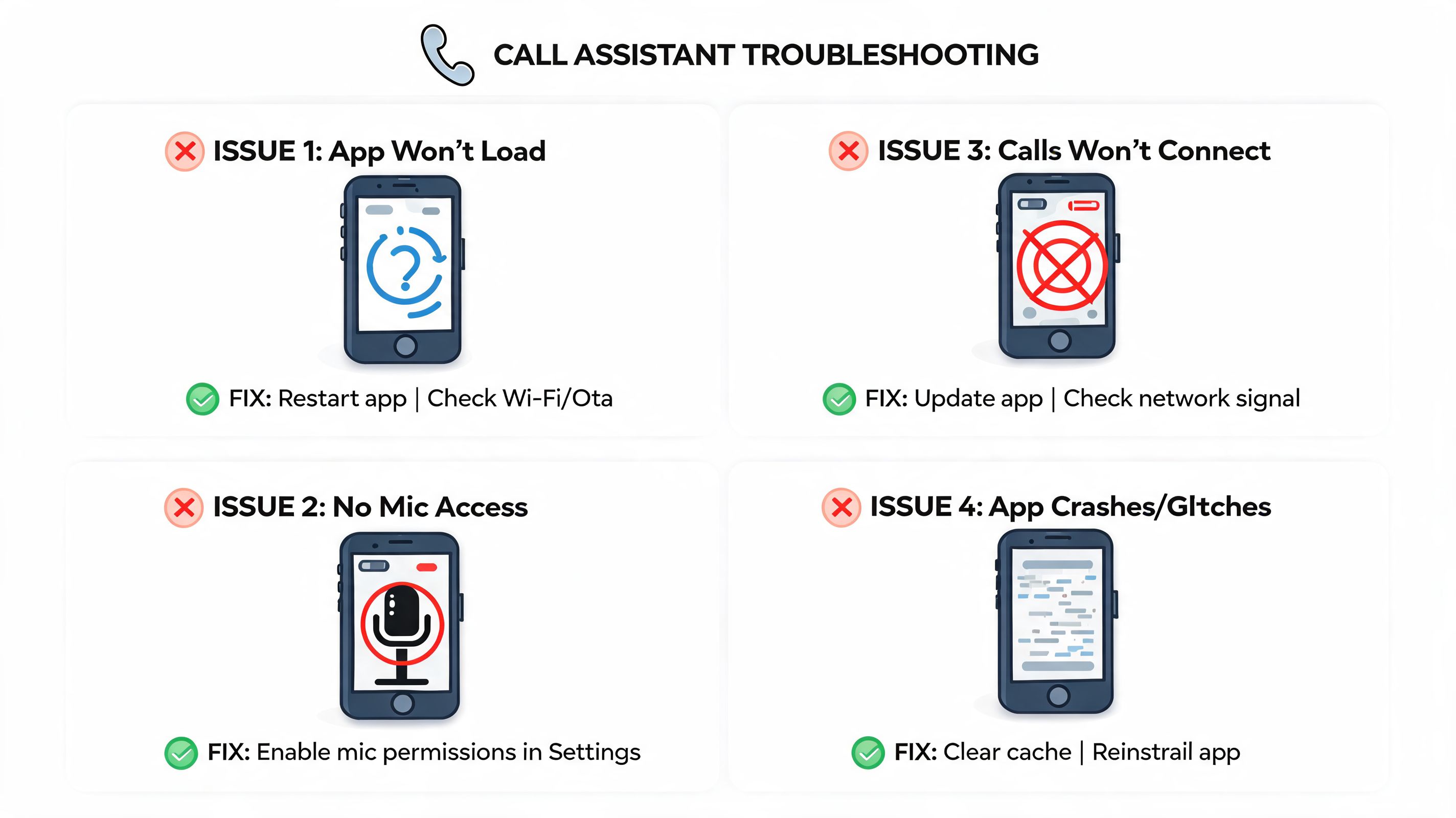
If the app crashes on launch
Start with the basics in this order:
Force close and reopen the app.
Clear cache, not data, first.
Check whether the installed build matches your Android version.
Remove battery optimization for that app if Android is restricting background processes.
If it still crashes, uninstall and reinstall only after confirming you didn’t grab an outdated or mismatched build.
If call screening or forwarding doesn’t activate
This usually points to setup drift. Re-check the forwarding or screening steps inside the app, then confirm Android hasn’t revoked any phone-related permissions after install.
Also look for conflicts with:
Default dialer settings
Carrier-specific call handling
Dual-SIM behavior
Do Not Disturb rules
Field note: When a call assistant “stops working,” the cause is often a system setting change after an OS update, not a total app failure.
If microphone or notification access keeps disappearing
Android can revoke access when an app sits unused or when the user denies prompts during a rushed setup. Open app permissions manually and review each one instead of waiting for the app to prompt again.
If the app needs to screen, transcribe, or alert you in the background, check notification permissions and battery controls together. One without the other often produces silent failure.
If the app works badly with your daily setup
Don’t keep fighting the wrong tool. If it breaks your dialer flow, delays callbacks, or creates confusion around missed calls, that’s a workflow problem, not just a bug. For professionals, reliability matters more than feature novelty.
Your Time Is Too Valuable for Risky Shortcuts
A call assistant apk can be installed safely enough if you’re disciplined. But “safely enough” still means source vetting, file scanning, permission review, compatibility testing, and a willingness to remove the app the moment it behaves oddly.
That’s a lot of overhead for something that’s supposed to reduce friction.
For a busy professional, the true cost isn’t just the security risk. It’s the attention tax. Every uncertain permission, unstable build, and unclear privacy policy pulls time away from client work, decisions, and actual communication. If your phone is part of your business, your standard should be higher than “the APK installed.”
Use sideloading only when you have a clear reason and a controlled device. For everyday call handling, choose a verified, integrated setup that respects your data and reduces the number of moving parts you need to manage.
If you want a more secure way to manage calls alongside messages, schedules, travel, and payments, take a look at Superchat. It’s built for people who want one private assistant workflow instead of a pile of disconnected apps and risky shortcuts.


