
You’re probably already doing this the hard way.
You check one banking app before breakfast. A budgeting app sends a category alert you mean to review later. Your calendar reminds you about a flight. An invoice is due this afternoon. A subscription renewed overnight. Somewhere in the middle of all that, you’re trying to answer a basic question: what needs my attention today, and what can wait?
That’s where an ai personal finance assistant starts to matter. Not as another dashboard to babysit, but as a working layer between your money, your schedule, and the actions that keep life moving. For busy professionals, that shift is the difference between “tracking finances” and staying on top of them.
Table of Contents
What Is an AI Personal Finance Assistant
More than a chatbot
How These AI Assistants Actually Work
The three-layer engine
How your data gets organized
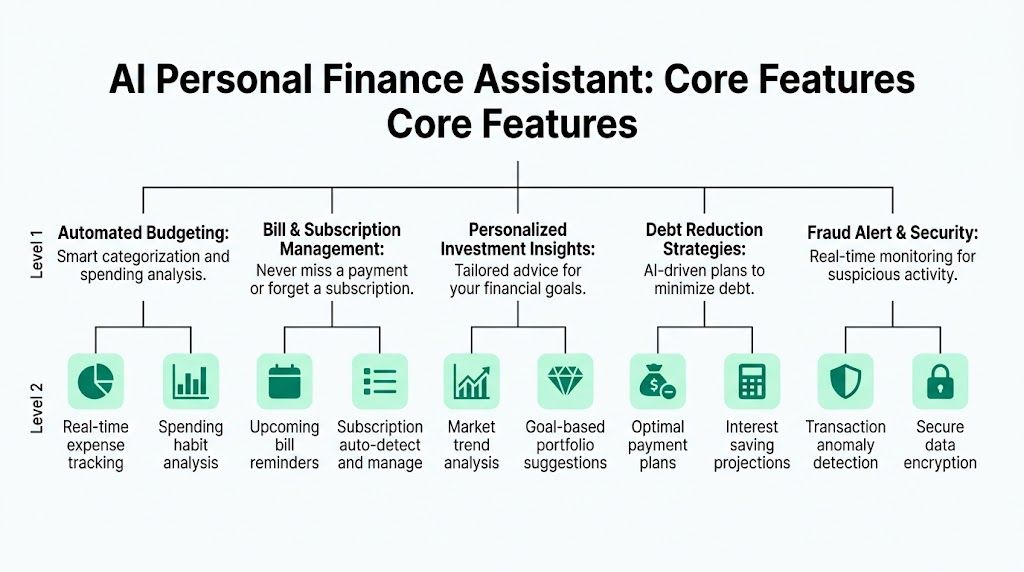
Core Features That Save You Time and Money
Three buckets of value
What this looks like in real life
Moving Beyond Budgeting to Integrated Life Management
Why siloed apps break under real workloads
One conversation instead of five apps
Navigating Privacy Security and Compliance
What to worry about
What good protection looks like
Sample Prompts and Workflows for Busy Professionals
Example prompts for financial management
A practical workflow
How to Choose the Right AI Finance Assistant
Integration depth
Privacy posture
Interface style
Level of action
Your personal workload
What Is an AI Personal Finance Assistant
A regular finance app records what already happened. An ai personal finance assistant helps you understand what’s happening now and what to do next.
Say you land from a work trip. You’ve got taxi receipts, a hotel charge, a client dinner, a card payment due soon, and a reminder that your internet bill is coming up. Many individuals handle this by jumping between apps and inboxes. That works, but it’s slow, and small misses add up.
An AI finance assistant is built to pull those threads into one place. It can track transactions, spot patterns, flag upcoming bills, and answer questions in normal language. It can turn information into action. That’s the leap.
This isn’t a fringe habit anymore. As of 2025, 46% of Americans use AI like ChatGPT for personal finances, and 50% express trust in AI for financial advice, according to FNBO’s 2025 Financial Wellbeing Study.
That matters because trust is the primary barrier in money tools. People don’t care that a system uses AI. They care whether it helps them avoid mistakes, save time, and make cleaner decisions.
More than a chatbot
A lot of readers hear “AI assistant” and picture a chat window that gives generic tips. That’s too narrow.
A useful assistant behaves more like:
A bookkeeper who notices where your money went
An operations assistant who remembers due dates and recurring tasks
A translator who explains your finances in plain English
A coordinator who helps connect spending with the rest of your day
A good AI finance assistant shouldn’t just answer “How much did I spend?” It should help answer “What should I do about it?”
That’s also why adjacent finance automation is worth understanding. If you want a quick look at the business side of this shift, AI in accounting helps automate tasks and speed up financial reporting, which shows the same core idea in a different setting.
For a busy founder, executive, or frequent traveler, the value isn’t novelty. It’s fewer loose ends.
How These AI Assistants Actually Work
The easiest way to understand the technology is to think of it as a digital finance team working in layers.
One layer watches your history. Another learns patterns over time. A third layer talks to you like a person instead of forcing you to learn a software interface.
The three-layer engine
According to the technical architecture described in this IJSRET paper, these assistants use predictive analytics, LSTM neural networks, and GPT-4 interfaces. That setup helps them forecast spending, learn time-based patterns in market data, and respond conversationally. The same source says this can improve budgeting accuracy by 15-20% compared with manual methods.
Here’s the plain-English version:
Layer | What it does | Simple analogy |
|---|---|---|
Predictive analytics | Reviews past spending and recurring behavior | A planner who knows your bills and habits |
LSTM neural networks | Learns patterns that unfold over time | An analyst who looks for rhythm, not just snapshots |
Conversational interface | Lets you ask questions naturally | A finance assistant you can text |
Most confusion comes from the middle layer. “Neural network” sounds abstract, but the practical point is simple. Some financial patterns only make sense as sequences. Your rent, salary, travel spikes, and quarterly expenses aren’t random. The model learns those rhythms.
How your data gets organized
The assistant usually connects through secure APIs. Then it pulls data into a structured pipeline, cleans it up, categorizes transactions, and generates summaries or alerts.
That’s why these systems feel smarter than a bank app. A bank app shows your account. An AI assistant tries to understand your behavior across accounts.
Typical flow:
Connect accounts securely. The system gets permission to access the data you authorize.
Normalize the mess. Merchant names, payment types, and dates get cleaned up.
Categorize activity. Travel, software, dining, utilities, payroll, and more.
Generate insight. “You’re on track.” “Your expenses usually jump next month.” “This subscription looks unused.”
If you’ve ever wondered how the raw admin side becomes efficient, this is the same logic behind tools that automate data entry with AI.com/blog/how-to-automate-data-entry). Finance assistants just apply it to transactions, bills, and patterns instead of forms alone.
Practical rule: If a tool can’t explain where its data comes from and how it organizes it, don’t trust the output.
If you want the broader mechanics in a simple walkthrough, this overview of how AI assistants work is useful: https://www.superchat.ai/blogs/how-ai-assistants-work
The point isn’t that the AI is magical. It’s that it’s good at repetitive financial housekeeping that many individuals are too busy to do consistently.
Core Features That Save You Time and Money
People often shop for an AI finance tool by looking for one feature. Budgeting. Investing. Bill reminders.
That’s backwards. The better question is: which jobs do I want this assistant to take off my plate every week?
Three buckets of value
Most useful features fall into three broad buckets.
Financial visibility
This is the foundation. If the assistant can’t show you a clean picture, everything else is weaker.
Look for features like:
Automatic categorization so groceries, travel, subscriptions, and bills don’t need constant manual sorting
Spending summaries that answer plain questions such as “What changed this month?”
Recurring charge detection so repeat payments don’t hide in the noise
Cross-account views so you’re not checking five balances separately
If you want an example of this user-facing layer, this expense feature overview shows how AI-based categorization can simplify daily tracking: https://www.superchat.ai/features/expense
Financial action
Time savings become apparent here.
A useful assistant doesn’t just display information. It nudges or helps execute tasks such as:
Bill reminders before due dates
Payment coordination for recurring obligations
Subscription reviews to identify ongoing services you may want to revisit
Scenario prompts like “If you book this trip now, your monthly free cash drops”
These are small jobs, but they’re exactly the sort of jobs that slip when your attention is scattered.
Financial planning
This layer turns a record-keeping tool into a decision tool.
That can include:
Investment summaries in plain language
Budget forecasting based on prior patterns
Debt payoff guidance
Goal tracking for savings, emergency funds, or major purchases
The difference is subtle but important. Visibility tells you what happened. Planning tells you what your current behavior is likely to produce.
What this looks like in real life
A consultant might ask the assistant for a monthly summary across cards and bank accounts. A founder might want subscriptions grouped by team, tool, or client. A frequent traveler might need all trip-related charges separated from everyday spending.
That’s why rigid apps often frustrate busy users. Their categories make sense to the software, not to your life.
The best assistants reduce friction in two places at once. They cut manual admin, and they reduce the mental effort of remembering what to check.
Another practical benefit is consistency. Manual systems often fail not because they’re wrong, but because people stop using them. A conversational assistant lowers that barrier. Asking “What bills hit this week?” is easier than opening a spreadsheet after a long day.
Good features don’t just save money directly. They save attention, which often protects money indirectly.
Moving Beyond Budgeting to Integrated Life Management
Most finance content stops at budgets, savings goals, and investment dashboards. That’s useful, but it misses the core problem busy people have.
Your financial decisions don’t happen in isolation. They happen while you’re booking travel, moving meetings, approving invoices, chasing reimbursements, and dealing with a calendar that changes by the hour.
A major gap in many tools is exactly this. Meegle’s overview of AI assistants for personal finance notes that many tools fail to integrate with non-financial life areas like travel and scheduling, even though users often need to do things like reschedule a meeting and pay a vendor in one chat.
Why siloed apps break under real workloads
A budgeting app may be good at labeling expenses. It usually won’t help when a business trip changes.
Here’s a common sequence:
Your flight gets moved
Your hotel date shifts
A meeting is rescheduled
A transfer to a contractor still needs to go out
You want all those costs tracked under one trip or client
With separate apps, each action lives in its own box. The calendar knows the meeting. The travel app knows the booking. The bank knows the charge. None of them understand the whole task.
That fragmentation is why people feel “organized” and still miss things.
One conversation instead of five apps
Here, an integrated assistant starts to feel different.
You might type something like:
Move my 3 p.m. meeting to tomorrow morning
Keep the same hotel if possible
Tag all Dubai trip expenses to the client project
Pay the vendor invoice before Friday
Remind me if the trip budget starts running high
That’s not just money management. It’s life coordination with financial context.
One option in this category is Superchat, which connects calendar, travel, finance, payments, and messaging in a single conversational workflow so users can handle bookings, schedules, and financial actions without bouncing across tools. That matters if your actual pain point isn’t “I need one more budgeting chart.” It’s “I need fewer disconnected systems.”
Here’s a quick product walkthrough that illustrates what this kind of chat-based execution can look like:
A traditional finance app is like a statement folder. An integrated assistant is closer to an operations desk. It sees the relationship between a payment, a date, a trip, and a follow-up.
If your work involves travel, vendor payments, and changing schedules, budgeting alone won’t solve the real bottleneck. Coordination will.
That’s the bigger shift. The next generation of an ai personal finance assistant won’t just report your financial life. It will help run it.
Navigating Privacy Security and Compliance
Linking your financial accounts is the moment many people hesitate. Fair enough.
Money data is sensitive on its own. Add messages, calendars, travel records, and payment history, and the risk feels larger because it is larger. The issue isn’t whether AI is convenient. The issue is whether the convenience is worth the exposure.
What to worry about
The privacy concern many individuals voice is simple: Who can see my data, and what else will they do with it?**
That concern is not overblown. According to Wealth Enhancement’s review of AI assistants for personal finance, users face privacy risks when linking multiple accounts, and the source highlights the importance of end-to-end encryption, compliance with rules such as GDPR and UAE PDPL, and policies that explicitly prohibit selling user data. It also notes that 70% of consumers fear AI data misuse.
That last point matters because many privacy promises are vague. “We take security seriously” doesn’t tell you much. You need specifics.
What good protection looks like
When you evaluate a tool, check for these concrete signals:
End-to-end encryption: Data should be protected in transit and at rest, not just behind a login screen.
Permission-based access: The tool should access only the data you authorize.
Clear data policy: Look for direct language on whether user data is sold, shared, or retained.
Compliance posture: If you operate internationally, GDPR and UAE PDPL are worth checking.
Scoped retrieval: If the system uses retrieval methods, it should only surface information you’re allowed to access.
A secure setup should feel more like a keycard system than an open filing cabinet. Different services and workflows should only get the slices of information they need.
A second issue is accuracy. AI can summarize well and still be wrong in small but costly ways. Don’t enter passwords or highly sensitive identity details into general AI apps, and don’t treat a conversational answer as the final word on high-stakes financial decisions.
Privacy isn’t just about hackers. It’s also about business models. If a product can’t clearly state how it handles your data, that’s part of the risk.
The best mindset is cautious adoption. Use the assistant for coordination, visibility, reminders, and structured decision support. Keep a human standard for final approval on major payments, investments, or compliance-sensitive moves.
Sample Prompts and Workflows for Busy Professionals
The easiest way to get value from an AI finance tool is to stop talking to it like a search engine. Treat it like an assistant with context.
Short, direct requests work better than vague prompts. Give the task, the time frame, and the result you want.
Example prompts for financial management
If you want better responses, this guide on how to talk to AI effectively is worth a read: https://www.superchat.ai/blogs/how-to-talk-to-ai-effectively
Here are practical prompts you can copy and adapt.
Task | Sample Prompt |
|---|---|
Trip spending review | Summarize my spending on the London client trip last week and group it by transport, hotel, meals, and miscellaneous. |
Subscription cleanup | What’s my current monthly burn rate for software subscriptions, and which charges look recurring? |
Bill planning | List all bills due in the next two weeks and tell me which ones need action today. |
Cash flow check | Based on my recent spending, am I likely to run tight before month-end? |
Invoice handling | Remind me about the Smith Consulting invoice and prepare it for payment before the due date. |
Travel budgeting | Create a spending watch for my upcoming Dubai trip and flag unusual costs while I’m there. |
Category analysis | Compare dining, transport, and software expenses this month versus last month. |
Goal tracking | How much did I move toward my savings goal this month, and what reduced progress? |
A few prompt habits help a lot:
Be specific about timing. “Last 30 days” is better than “recently.”
Name the output. Say whether you want a summary, a list, a warning, or an action.
Use your own categories. If “client travel” matters more than “transport,” say that.
A practical workflow
Here’s a realistic day-in-the-life example for a founder traveling for meetings.
Morning: You ask for today’s schedule, upcoming payments, and any unusual charges.
Midday: A meeting moves. You want travel timing adjusted, the schedule updated, and related expenses grouped to the right project.
Evening: You ask for a quick recap. What did I spend today, what’s still unpaid, and what needs attention tomorrow?
That workflow works because the assistant is acting across context, not just replying to isolated questions.
Try this sequence:
“Show me today’s meetings, bills due soon, and any pending invoices.”
“Track all spending related to my Abu Dhabi trip under business travel.”
“Remind me tonight if any payment still needs approval.”
“Give me a short end-of-day money summary.”
This style works well for busy professionals because it matches how work happens. You’re not doing one neat finance session. You’re making quick decisions across a messy day.
How to Choose the Right AI Finance Assistant
The market is expanding quickly. According to Intel Market Research, the global AI Financial Assistant market was valued at USD 296 million in 2024 and is projected to reach USD 459 million by 2032. More tools will keep appearing. That makes selection more important, not less.
Start with fit, not hype.
Ask these questions:
Integration depth
Does the tool connect only to bank accounts, or can it also work with calendars, payments, travel, and messages?
If your real problem is fragmented work, a finance-only app may solve the wrong problem.
Privacy posture
Read the policy like a buyer, not a fan.
Check whether the product explains encryption, permissions, data sharing, and whether user data is sold. If the language is slippery, move on.
Interface style
Some people want dashboards. Others want a chat thread.
A busy executive on the move may get more value from “Pay this tomorrow and remind me at 9” than from another analytics panel.
Level of action
Can it only analyze, or can it help coordinate and complete tasks?
That difference matters. Insight is helpful. Execution saves time.
Your personal workload
Choose based on the pressure points you have:
Frequent traveler: Prioritize trip, schedule, and payment coordination.
Founder: Look for vendor, subscription, and invoice visibility.
Executive: Focus on concise summaries, reminders, and quick approvals.
The right ai personal finance assistant should make your day lighter, not more complicated. If it adds setup pain without reducing app-switching, it’s not the right fit.
If you want one place to manage schedules, travel, payments, and money tasks in a single private conversation, Superchat is built for that style of work. It connects everyday actions across your day so you can spend less time coordinating apps and more time deciding what matters.
Created with Outrank tool


